macOS Sequoia 15.7.8 - AMD Hackintosh won't sleep (Ryzen 5 5600G / NootedRed)

weyn

New member
AMD OS X Member
Aug 5, 2026
2
0
1
CPU:
AMD Ryzen 5 5600G
Greetings.

I'm new to the forum, and this is my first post here, so please bear with me if I've missed anything or if there's a better way to provide information. I've tried to include as much detail as possible to make troubleshooting easier.

With that being said...

I'm trying to fix sleep on my AMD Hackintosh and I'm running out of ideas.

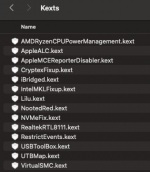
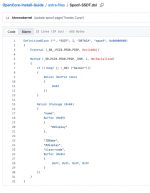
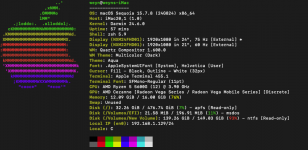
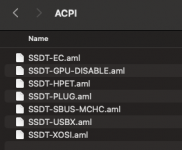
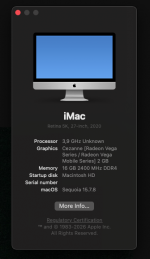
For reference, I've attached my EFI, config.plist, a Fastfetch screenshot with my system information, and screenshots of my ACPI and Kexts folders.

Hardware​

  • Motherboard: ASRock B450M Pro4 R2.0
  • CPU: Ryzen 5 5600G
  • iGPU: Vega (using NootedRed)
  • dGPU: RTX 3050 (physically installed but unsupported/disabled)
  • macOS: Sequoia 15.7.8
  • SMBIOS: iMac20,1
  • OpenCore (latest release)

Current behavior​

When I choose Apple Menu → Sleep:
  • Both displays turn off.
  • The PC never actually enters sleep.
  • CPU/case fans continue spinning.
  • Pressing or moving the mouse immediately turns the displays back on.
  • There is no reboot or kernel panic.
It feels like macOS is only putting the displays to sleep and never reaching the actual system sleep state.

EFI / Configuration​

I'm using:
  • SSDT-EC
  • SSDT-GPU-DISABLE
  • SSDT-HPET
  • SSDT-PLUG
  • SSDT-SBUS-MCHC
  • SSDT-USBX
  • SSDT-XOSI
USB configuration:
  • USBToolBox.kext
  • UTBMap.kext
  • USBX SSDT
  • XhciPortLimit = False
The RTX 3050 is disabled via SSDT-GPU-DISABLE, and the system runs exclusively on the Ryzen 5 5600G iGPU using NootedRed.

Because SSDT-GPU-DISABLE breaks my onboard audio, I'm injecting the NVIDIA dGPU's HDMI/DisplayPort audio device in DeviceProperties as external-audio, which allows AppleALC to initialize the internal Realtek audio correctly. Without this DeviceProperties injection, the onboard audio does not work. (See in config.plist DeviceProperties comments)

What I've already checked​

  • All USB ports have been properly mapped on Windows.
  • pmset -g assertions only reports normal assertions such as Brave browser (audio/video), Bluetooth, and USB devices.
  • GPRW, UPRW, and LANC do not exist in my ACPI (ioreg returns nothing for all three).
  • Boot arguments currently are:
    • -lilubetaall revpatch=sbvmm
  • My IORegistry has already been inspected, and nothing obvious stood out regarding the disabled NVIDIA GPU.
  • Taking a look at this post, I have not applied the AZAL → HDEF ACPI rename because it isn't clear whether it's actually needed on this board.
  • In the BIOS, Wake on LAN, Wake on USB, Wake on Bluetooth, ErP, and TPM are all disabled.

Additional information​

I'm not sure whether this could be caused by an ACPI quirk specific to my ASRock B450M Pro4 R2.0 motherboard, an issue related to NootedRed, or something else entirely.

Any suggestions on what to inspect next or known fixes for a system that only turns off the displays but never actually enters sleep would be greatly appreciated.

Thanks in advance for any help!
1785938285480.png1785938312757.pngAbout This Mac.png1785938327717.png
 

Attachments

Greetings.

I'm new to the forum, and this is my first post here, so please bear with me if I've missed anything or if there's a better way to provide information. I've tried to include as much detail as possible to make troubleshooting easier.

With that being said...

I'm trying to fix sleep on my AMD Hackintosh and I'm running out of ideas.

For reference, I've attached my EFI, config.plist, a Fastfetch screenshot with my system information, and screenshots of my ACPI and Kexts folders.

Hardware​

  • Motherboard: ASRock B450M Pro4 R2.0
  • CPU: Ryzen 5 5600G
  • iGPU: Vega (using NootedRed)
  • dGPU: RTX 3050 (physically installed but unsupported/disabled)
  • macOS: Sequoia 15.7.8
  • SMBIOS: iMac20,1
  • OpenCore (latest release)

Current behavior​

When I choose Apple Menu → Sleep:
  • Both displays turn off.
  • The PC never actually enters sleep.
  • CPU/case fans continue spinning.
  • Pressing or moving the mouse immediately turns the displays back on.
  • There is no reboot or kernel panic.
It feels like macOS is only putting the displays to sleep and never reaching the actual system sleep state.

EFI / Configuration​

I'm using:
  • SSDT-EC
  • SSDT-GPU-DISABLE
  • SSDT-HPET
  • SSDT-PLUG
  • SSDT-SBUS-MCHC
  • SSDT-USBX
  • SSDT-XOSI
USB configuration:
  • USBToolBox.kext
  • UTBMap.kext
  • USBX SSDT
  • XhciPortLimit = False
The RTX 3050 is disabled via SSDT-GPU-DISABLE, and the system runs exclusively on the Ryzen 5 5600G iGPU using NootedRed.

Because SSDT-GPU-DISABLE breaks my onboard audio, I'm injecting the NVIDIA dGPU's HDMI/DisplayPort audio device in DeviceProperties as external-audio, which allows AppleALC to initialize the internal Realtek audio correctly. Without this DeviceProperties injection, the onboard audio does not work. (See in config.plist DeviceProperties comments)

What I've already checked​

  • All USB ports have been properly mapped on Windows.
  • pmset -g assertions only reports normal assertions such as Brave browser (audio/video), Bluetooth, and USB devices.
  • GPRW, UPRW, and LANC do not exist in my ACPI (ioreg returns nothing for all three).
  • Boot arguments currently are:
    • -lilubetaall revpatch=sbvmm
  • My IORegistry has already been inspected, and nothing obvious stood out regarding the disabled NVIDIA GPU.
  • Taking a look at this post, I have not applied the AZAL → HDEF ACPI rename because it isn't clear whether it's actually needed on this board.
  • In the BIOS, Wake on LAN, Wake on USB, Wake on Bluetooth, ErP, and TPM are all disabled.

Additional information​

I'm not sure whether this could be caused by an ACPI quirk specific to my ASRock B450M Pro4 R2.0 motherboard, an issue related to NootedRed, or something else entirely.

Any suggestions on what to inspect next or known fixes for a system that only turns off the displays but never actually enters sleep would be greatly appreciated.

Thanks in advance for any help!
View attachment 19563View attachment 19564View attachment 19571View attachment 19565
Hi everyone,

I just realized I accidentally posted this thread in the Installation section instead of Post-Installation. I sincerely apologize for the mistake.

If a moderator could either move the thread to the appropriate section or delete it so I can repost it in the correct one, I'd really appreciate it.

Sorry for the inconvenience, and thank you!
 
Greetings.

I'm new to the forum, and this is my first post here, so please bear with me if I've missed anything or if there's a better way to provide information. I've tried to include as much detail as possible to make troubleshooting easier.

With that being said...

I'm trying to fix sleep on my AMD Hackintosh and I'm running out of ideas.

For reference, I've attached my EFI, config.plist, a Fastfetch screenshot with my system information, and screenshots of my ACPI and Kexts folders.

Hardware​

  • Motherboard: ASRock B450M Pro4 R2.0
  • CPU: Ryzen 5 5600G
  • iGPU: Vega (using NootedRed)
  • dGPU: RTX 3050 (physically installed but unsupported/disabled)
  • macOS: Sequoia 15.7.8
  • SMBIOS: iMac20,1
  • OpenCore (latest release)

Current behavior​

When I choose Apple Menu → Sleep:
  • Both displays turn off.
  • The PC never actually enters sleep.
  • CPU/case fans continue spinning.
  • Pressing or moving the mouse immediately turns the displays back on.
  • There is no reboot or kernel panic.
It feels like macOS is only putting the displays to sleep and never reaching the actual system sleep state.

EFI / Configuration​

I'm using:
  • SSDT-EC
  • SSDT-GPU-DISABLE
  • SSDT-HPET
  • SSDT-PLUG
  • SSDT-SBUS-MCHC
  • SSDT-USBX
  • SSDT-XOSI
USB configuration:
  • USBToolBox.kext
  • UTBMap.kext
  • USBX SSDT
  • XhciPortLimit = False
The RTX 3050 is disabled via SSDT-GPU-DISABLE, and the system runs exclusively on the Ryzen 5 5600G iGPU using NootedRed.

Because SSDT-GPU-DISABLE breaks my onboard audio, I'm injecting the NVIDIA dGPU's HDMI/DisplayPort audio device in DeviceProperties as external-audio, which allows AppleALC to initialize the internal Realtek audio correctly. Without this DeviceProperties injection, the onboard audio does not work. (See in config.plist DeviceProperties comments)

What I've already checked​

  • All USB ports have been properly mapped on Windows.
  • pmset -g assertions only reports normal assertions such as Brave browser (audio/video), Bluetooth, and USB devices.
  • GPRW, UPRW, and LANC do not exist in my ACPI (ioreg returns nothing for all three).
  • Boot arguments currently are:
    • -lilubetaall revpatch=sbvmm
  • My IORegistry has already been inspected, and nothing obvious stood out regarding the disabled NVIDIA GPU.
  • Taking a look at this post, I have not applied the AZAL → HDEF ACPI rename because it isn't clear whether it's actually needed on this board.
  • In the BIOS, Wake on LAN, Wake on USB, Wake on Bluetooth, ErP, and TPM are all disabled.

Additional information​

I'm not sure whether this could be caused by an ACPI quirk specific to my ASRock B450M Pro4 R2.0 motherboard, an issue related to NootedRed, or something else entirely.

Any suggestions on what to inspect next or known fixes for a system that only turns off the displays but never actually enters sleep would be greatly appreciated.

Thanks in advance for any help!
View attachment 19563View attachment 19564View attachment 19571View attachment 19565
Hello @weyn , the single most common reason sleep/ wake behavior fails is due to incorrect USB Port mapping. Take my word for it that there are countless posts everywhere dealing with this very common issue. Other less common reasons can be caused by some software and or add in hardware. A quick look at your UTBMap.kext shows no proper port mapping for your USB C port, same for the two internal ports that support Bluetooth and your LED header.

Per Asrock on your board:
  • 1 x RGB LED Header*
  • 2 x USB 2.0 Ports (Supports ESD Protection)
  • 1 x USB 3.2 Gen2 Type-A Port (10 Gb/s) (Supports ESD Protection)
- 1 x USB 3.2 Gen2 Type-C Port (10 Gb/s) (Supports ESD Protection)
- 4 x USB 3.2 Gen1 Ports (Supports ESD Protection)

I stole this port mapping guide from our friend Ed Hawk, take a look and you can see USB C ports are typically identified as type 9 (both corresponding HS0 and S0 ports) less commonly as type 10.
Internal ports are usually mapped as type 255. Your port mapping only contains type 0 (USB2) and type 3 (USB3) and that is all it takes to cause sleep issues. Port mapping is rarely once and done and usually requires a bit of trial and error to get it right. See below...you'll want to go through your mapping again, for me it really it helps if I label the ports.

How to set USB Port Status

  1. USB2 (0) - Physical USB2 ports on rear I/O plate, these ports always have a Black coloured tang.
  2. USB3 (3) - Physical USB3 ports on rear I/O plate, these ports can have a Red, Blue, Cyan or Yellow coloured tang.
    1. Virtual USB2 ports - served from physical USB3 ports) should be set with the same connector type as the physical port
  3. USB3 (3) - Motherboard Header, usually serving the case front USB3 ports.
    1. Virtual USB2 ports - served from physical USB3 ports) should be set the same as the physical port
  4. Internal (255) - Motherboard USB2 header, this will be any device served from a header port, such as Bluetooth module, case front USB2 ports, case front card reader etc.
    1. Internal connector type should also be used for any Bluetooth USB connection from a built-in M.2 connector (on the Rear I/O plate).
  5. Type-c+sw (9) - Type-C connector on Rear I/O plate, will only show two ports being available,
    1. when the Type-C device is inserted, removed, flipped 180° and reinserted, 1 x Physical Type-C and 1 x virtual USB2 port.
  6. Type-c (10) - Type-C (E) motherboard header, will show four ports being available from a single Type-C connector,
    1. when the Type-C device is inserted, removed, flipped 180° and reinserted, 2 x Type-C and 2 x USB2.
 
It is in the Post Installation forum, so no need to move it.

I have been looking through your OC EFI and would comment as follows:

It is usually best not to use DeviceProperties with NootedRed.kext, as per the recommendations by Chef Kiss the kext's developer. They are known to cause unexpected issues when used in conjunction with NootedRed.kext.

You should not be injecting an Intel (UHD 630) IGPU's Framebuffer (AALP,ig-platform-id) when you are using an AMD IGPU. This entry should be deleted as it is completely incorrect for your System.

Screenshot 2026-08-05 at 18.41.45.png

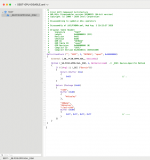
When checking your SSDT-GPU-Disabled.aml table against the original table over at Dortania post installation guide, I noticed a few 'additions' to the table you are using.

This is how the original SSDT appears.

Screenshot 2026-08-05 at 18.29.45.png Original (RAW view) of SSDT.

Screenshot 2026-08-05 at 18.30.08.png Your version of the SSDT, with the additional parts highlighted in RED rectangles.

Screenshot 2026-08-05 at 18.30.08.png This is how I think your SSDT should look, i.e. matches the original except where your dGPU's Address is provided.

You have SSDT-HPET.aml and SSDT-XOSI.aml present and enabled in your /EFI/OC/ACPI folder and config.plist, which is normally fine for an AMD Hack. However, you have failed to add the ACPI patches that accompany these SSDTs, which would have been created and added to the OC_patches.plist generated when the SSDTs were created in Corpnewt's SSDTTime script. Without the accompanying ACPI patches in your config.plist, these two SSDTs will do nothing for your system. You may as well delete then from the ACPI folder and ACPI > Add section in your config.plist.

You should not be using -lilubetaall boot argument with Sequoia. It isn't required and should be deleted from your config.plist.

I have cleaned up your EFI & config.plist to take in to account the items listed above, plus removed a number of unused entries from your config.plist. The config.plist contains no errors or issues when tested with ocvalidate from OpenCore v1.0.7.

The issues with your UTBMap.kext were also noted but @leesurone beat me to that issue. Those I have not attempted to rectify.
 

Attachments

  • Screenshot 2026-08-05 at 18.33.33.png
    Screenshot 2026-08-05 at 18.33.33.png
    142.6 KB · Views: 0
  • EFI.zip
    EFI.zip
    12.4 MB · Views: 0
  AdBlock Detected
Sure, ad-blocking software does a great job at blocking ads, but it also blocks some useful and important features of our website. For the best possible site experience please take a moment to disable your AdBlocker.