
Gpu performance on AMD Hackintosh
- Thread starter Tyoma
- Start date
-
Hello Guest. Before you post check the Troubleshooting guide here, Dortania Troubleshooting
You are using an out of date browser. It may not display this or other websites correctly.
You should upgrade or use an alternative browser.
You should upgrade or use an alternative browser.

You just need to use these kexts on a AMD build along with VirtualSMC to use agpinjector.
 forum.amd-osx.com
SMCAMDProcessor
XNU kernel extension for power management and monitoring of AMD processors. Also comes with a plugin for VirtualSMC to export readings to other applications.
forum.amd-osx.com


Thanks man!You just need to use these kexts on a AMD build along with VirtualSMC to use agpinjector.
SMCAMDProcessor
XNU kernel extension for power management and monitoring of AMD processors. Also comes with a plugin for VirtualSMC to export readings to other applications.

Unless things changed on Big Sur you'll need SSDT-PLUG to enable the X86PlatformPlugin to allow the AGPM to attach.
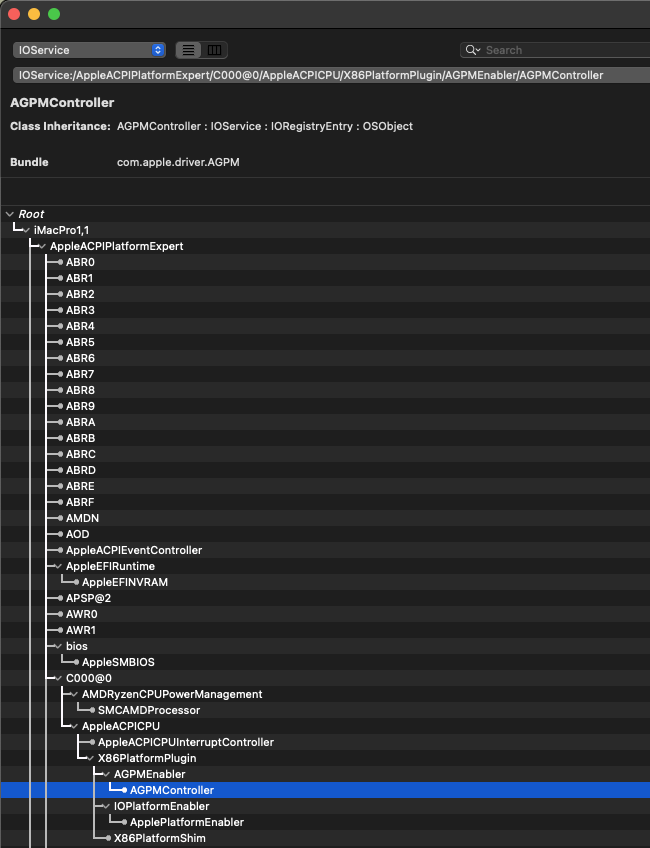
Unless things changed on Big Sur you'll need SSDT-PLUG to enable the X86PlatformPlugin to allow the AGPM to attach.
Whoops, I think your right there buddy, My Bad....

Oh hold on, According to the OC Guide the Kexts do the job too no?
Or am I reading it wrong?
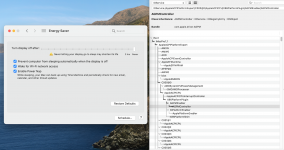
@Tyoma Heres SSD-PLUG to enable the X86PlatformPlugin.
Ive not tested it on a MSI board but it shouldn't matter and should work fine.
You can check to see if its worked after applying it by checking Energy Saver in System Preferences.
If its working your see the option to Enable Power Nap Showing in there.
Please do let me know if its working for you.
Ive not tested it on a MSI board but it shouldn't matter and should work fine.
You can check to see if its worked after applying it by checking Energy Saver in System Preferences.
If its working your see the option to Enable Power Nap Showing in there.
Please do let me know if its working for you.
Attachments
Last edited:


What SMBios are you using I can’t remember?
if you're using iMacPro1,1 what are your controller names?
Take a screenshot on your usb via hackintool and show me please buddy?
if you're using iMacPro1,1 what are your controller names?
Take a screenshot on your usb via hackintool and show me please buddy?
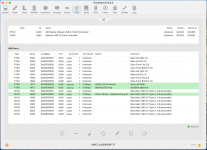
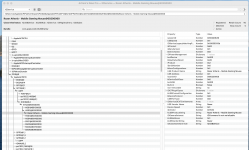
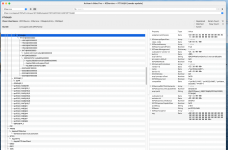
Ok so looking at your usb mapping I can see one big mistake going on there with your port assignments.
when you list a port type it doesn’t work on what your sending down it but what the port actually is to start with.
so if you have a USB 3 port and your also sending usb2 down it you list the port as a USB3 port.
HS01 to HS04 on PTXH should all be listed as usb 3 not 2, and the same thing with HS01 to HS04 on XHC0, All should be listed as USB3 (the ports themselves are usb3 ports and that’s what counts)
when you list a port type it doesn’t work on what your sending down it but what the port actually is to start with.
so if you have a USB 3 port and your also sending usb2 down it you list the port as a USB3 port.
HS01 to HS04 on PTXH should all be listed as usb 3 not 2, and the same thing with HS01 to HS04 on XHC0, All should be listed as USB3 (the ports themselves are usb3 ports and that’s what counts)
Ok so looking at your usb mapping I can see one big mistake going on there with your port assignments.
when you list a port type it doesn’t work on what your sending down it but what the port actually is to start with.
so if you have a USB 3 port and your also sending usb2 down it you list the port as a USB3 port.
HS01 to HS04 on PTXH should all be listed as usb 3 not 2, and the same thing with HS01 to HS04 on XHC0, All should be listed as USB3 (the ports themselves are usb3 ports and that’s what counts)
My friend, I got lost
 . I can't get where I'm wrong...
Lets take this port for example:
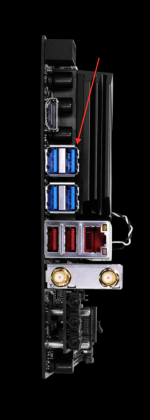
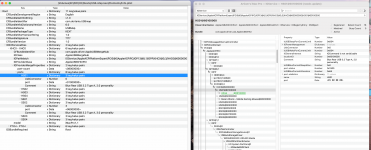
When I connect an USB2.0 to this port, it appears in this address :
Then, I plug an USB3.0 stick to the same port:
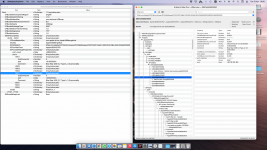
So, where's my mistake? I should name all ports "3", even if it addresses to usb2.0 port?
(Dortania's guide says, that its 2 addresses for USB3.0 port.. one for 2.0 and the second one is for 3.0 and above..)
What colour is the port?
if it’s blue it’s not usb2.
You list the port your using not the usb type your sending down it.
Make sense?
if it’s blue it’s not usb2.
You list the port your using not the usb type your sending down it.
Make sense?
Example of USB perfectly mapped out .....
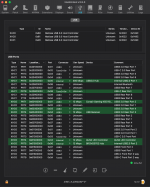
You have SS01 and HS01 coming out of the same USB Port yet you are telling the OS with your map that SS01 is a USB3 port and HS01 is a USB2 port. This is incorrect as the port is a USB3 port and so you mark it as such regardless if your sending USB2 or 3 down it.
You have SS01 and HS01 coming out of the same USB Port yet you are telling the OS with your map that SS01 is a USB3 port and HS01 is a USB2 port. This is incorrect as the port is a USB3 port and so you mark it as such regardless if your sending USB2 or 3 down it.
a sort of.. I don't have any usb2.0 ports on my motherboard... only 3.XWhat colour is the port?
if it’s blue it’s not usb2.
You list the port your using not the usb type your sending down it.
Make sense?
So I changed all "0" ports to "3"..
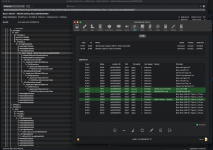
Didn't help..
Also tried another wireless mouse - same sh*t
No lags with wired mouse :/
It occurs only with usb3 sticks.. no problem with usb2 :?
WTF I'm doing wrong?

I think it has something to do with USB3.0 & 2.4Ghz interference 
I just remembered that I had kind of same problem with my MBP.. (it loses 2.4 wifi signal when I connect usb3.0 external SSD)..
USB 3.0* Radio Frequency Interference Impact on 2.4 GHz Wireless Devices
Thank you much guys, and sorry for wasting you time..
I just remembered that I had kind of same problem with my MBP.. (it loses 2.4 wifi signal when I connect usb3.0 external SSD)..
USB 3.0* Radio Frequency Interference Impact on 2.4 GHz Wireless Devices
Can't believe I forgot about thisA similar impact to wireless mouse performance was noted if a USB 3.0 device, such as a flash drive, was used.
Thank you much guys, and sorry for wasting you time..
Last edited: