AMD Rayon R7 6800H Install Ventura kernel Panic

redhorse1990

Member
AMD OS X Member
Jul 2, 2022
202
11
18
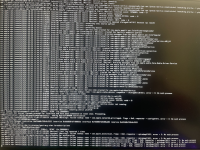
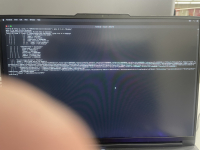
Hello everyone, I have encountered a kernel panic problem for booting up Ventura installation from U flash. Would kindly anybody give me some help?
Brand: Lenovo
Model: Legion slim 7 Gen 7
CPU: AMD Ryzen 7 6800h
GPU: AMD Radeon RX 6600s ( Separate GPU mode)
HDD: Crucial P3 Plus 1TB PCIe Gen4 3D NAND NVMe M.2 SSD
Network: RealTek Semiconductor RTL8168/8111 PCI-E Gigabit Ethernet NIC
Intel(R) Wi-Fi 6E AX210 160MHz
Ram: x2 8GB 3200mhz ddr4
Display: 15.6 1080p 165HZ
 

Attachments

  • EFI-3.zip
    EFI-3.zip
    20.8 MB · Views: 61
  • IMG_0382.jpeg
    IMG_0382.jpeg
    3.1 MB · Views: 87
  • IMG_0380.jpeg
    IMG_0380.jpeg
    4.3 MB · Views: 83
Some AMD laptop owners had to resort to using GenericUSBXHCI.kext to fix not being able to use their USB ports. This is an old USB kext, which was dropped from use on Intel systems some years ago. So not sure it will work, but may be worth a try to see if one or more USB ports are enabled so you can complete the macOS installation.

Download:

I can't recall if you have created a UTBMap.kext in Windows, using the USBToolBox python script. If not you may want to see if doing so helps. This is an alternative and better option than using the GenericUSBXHCI.kext.

Main Page:

Download:

Guide:
Hi, I have some recent updates.
With the help of https://github.com/hbyonly1/XHCILagFix , the usb issue is resolved.
I can boot into the installation and recovery dmg right now.
But still having amd gpu driver issue during installation.
1793318950113.png
And I have also checked my gpu device properties on recovery mode and got this.
1793319057471.png
Here is my current EFI file. Still have no idea which part is not working. Any help on the direction of resolving this issue is appreciated. Thanks
 

Attachments

Last edited:
I just fixed all the problems. Replacing the nootedred.kext with the latest version in my previous EFI would work. However the onboard speaker is still not working. Need to debug with CirrusAudioFixup.kext to fix
 
我将这台电脑的硬盘移动到另一台黑苹果中完成系统安装,然后再将硬盘插回来

I moved the hard disk of this computer to another black apple to complete the system installation, and then plug the hard disk back in.
 
Last edited by a moderator:
我将这台电脑的硬盘移动到另一台黑苹果中完成系统安装,然后再将硬盘插回来
你nvidia gpu怎么驱动的啊?想问下你的内置摄像头能工作吗?

How do you drive nvidia gpu? I want to ask if your built-in camera can work?
 
Last edited by a moderator:
你nvidia gpu怎么驱动的啊?想问下你的内置摄像头能工作吗?
使用1401项目打的rtx3060驱动:https://github.com/nullmoth/1401 目前基本可用,还没测帧率,但是办公没问题。摄像头现在不可用,我还没尝试修复它。我修复了触控板,另外我用你的办法修复了我的电脑的USB。我现在正在想办法修摄像头和声卡

The rtx3060 driver using the 1401 project: https://github.com/nullmoth/1401 is basically available at present. The frame rate has not been measured yet, but there is no problem with office work. The camera is not available now, and I haven't tried to fix it yet. I repaired the trackpad, and I also used your method to repair the USB of my computer. I'm trying to fix the camera and sound card now.
 
Last edited by a moderator:
使用1401项目打的rtx3060驱动:https://github.com/nullmoth/1401 目前基本可用,还没测帧率,但是办公没问题。摄像头现在不可用,我还没尝试修复它。我修复了触控板,另外我用你的办法修复了我的电脑的USB。我现在正在想办法修摄像头和声卡
等补丁吧

Wait for the patch.
 
Last edited by a moderator:
使用1401项目打的rtx3060驱动:https://github.com/nullmoth/1401 目前基本可用,还没测帧率,但是办公没问题。摄像头现在不可用,我还没尝试修复它。我修复了触控板,另外我用你的办法修复了我的电脑的USB。我现在正在想办法修摄像头和声卡
声卡修复要等这个

The sound card repair needs to wait for this.
 
Last edited by a moderator:
声卡修复要等这个
我的笔记本不一样,是暗影骑士龙2022,扬声器由 ALC287 驱动,板载声卡当前成功修复。rtx3060跑满1k165hz毫无压力。目前仅剩原生WiFi和蓝牙是一条死路,我打算买一个新的无线网卡,应该就完美了

My laptop is different. It's Shadow Knight Dragon 2022. The speaker is driven by ALC287, and the on-board sound card has been successfully repaired. Rtx3060 runs at full 1k165hz without pressure. At present, only native WiFi and Bluetooth are left as a dead end. I plan to buy a new wireless network card, which should be perfect.
 
Last edited by a moderator:
我的笔记本不一样,是暗影骑士龙2022,扬声器由 ALC287 驱动,板载声卡当前成功修复。rtx3060跑满1k165hz毫无压力。目前仅剩原生WiFi和蓝牙是一条死路,我打算买一个新的无线网卡,应该就完美了
你怎么修复版载声卡的啊?

How did you repair the version of the sound card?
 
Last edited by a moderator:
用这个修声卡https://github.com/acidanthera/AppleALC
AppleALC.kext + boot-args alcid=13,对应 Realtek ALC287。扬声器、耳机、内置麦、Line In 均可用
我现在没有购买新的网卡。我现在只有摄像头没有修复,wifi和蓝牙都修好了。现在所有功能已经完美了。
我也是用的https://github.com/acidanthera/AppleALC applealc.kext + boot-args = 21 (13), 对应的书 Reatltek ALC287, 耳机line in均可用,但是扬声器内置麦打不开

Use this sound repair card https://github.com/acidanthera/AppleALC

AppleALC.kext + boot-args alcid=13, corresponding to Realtek ALC287. Speakers, headphones, built-in microphone, Line In can all be used

I haven't bought a new network card now. Now only the camera has not been repaired, and the wifi and Bluetooth have been repaired. Now all the functions are perfect.
 
Last edited by a moderator:
我也是用的https://github.com/acidanthera/AppleALC applealc.kext + boot-args = 21 (13), 对应的书 Reatltek ALC287, 耳机line in均可用,但是扬声器内置麦打不开
我的麦克风可用。我找到另一个可用的修复USB的项目,用这个可以避免因修复USB导致摄像头不可用https://github.com/MonkaKokosowa/XhciNudge

My microphone is available. I found another useable USB repair project, which can be used to avoid the unuseable camera due to USB repair https://github.com/MonkaKokosowa/XhciNudge
 
Last edited by a moderator:
我也是用的https://github.com/acidanthera/AppleALC applealc.kext + boot-args = 21 (13), 对应的书 Reatltek ALC287, 耳机line in均可用,但是扬声器内置麦打不开
你现在安装的是macos15还是macos26?15:AppleALC + alcid=13;26:AppleHDA 已被删除,必须再加 SimpleHDA.kext

Are you installing macos15 or macos26 now? 15: AppleALC + alcid=13; 26: AppleHDA has been deleted, SimpleHDA.kext must be added
 
Last edited by a moderator:
✖
  AdBlock Detected
Sure, ad-blocking software does a great job at blocking ads, but it also blocks some useful and important features of our website. For the best possible site experience please take a moment to disable your AdBlocker.