Hi everyone,
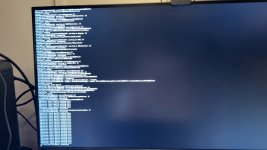
I'm trying to install Tahoe on this PC, but I haven't managed to reach the recovery screen. OpenCore loads the recovery image and verbose boot starts, then it stops around CoreAnalyticsHub / early IOKit initialization. I left earlier attempts for five minutes with no change. A fresh test still stops at the same stage.
Specs:
What I've tried so far:
-v keepsyms=1 debug=0x108 -lilubetaall io=0x80003f iokit_print_verbose_match_logs=1
The latest screen repeats "IOResources: family specific matching fails" and ends with a configuration-thread termination message. I don't know which thread is actually blocked.
Two things I should mention: USB is still using USBToolBox + UTBDefault; I haven't made a proper port map yet. The EFI also contains a locally modified DebugEnhancer and an early-console kernel patch added during troubleshooting. I haven't ruled out those changes affecting the result.
I've attached the EFI used for this test and a screenshot of the last screen. SMBIOS details are removed, and DebugEnhancer's debug symbols were stripped to remove local build paths. The original DSDT is at the top level of the ZIP for reference.
Could someone check whether there's an obvious problem in the ACPI/PCI setup? What would be the best way to get a useful trace at this point, or establish a cleaner baseline?
Thanks for taking a look.
I'm trying to install Tahoe on this PC, but I haven't managed to reach the recovery screen. OpenCore loads the recovery image and verbose boot starts, then it stops around CoreAnalyticsHub / early IOKit initialization. I left earlier attempts for five minutes with no change. A fresh test still stops at the same stage.
Specs:
- CPU: Ryzen 7 9800X3D, 8 cores / 16 threads
- Board: ASUS TUF GAMING B850M-PLUS WIFI, BIOS 1065 (original WIFI model, not WIFI7)
- GPU: RX 6900 XT, device ID 1002:73BF; monitor connected by DisplayPort
- RAM: 48 GB DDR5, EXPO 6000
- SSDs: Samsung 990 EVO Plus 1 TB (macOS target), Lexar ARES PRO 1 TB, aigo P7000Z 2 TB
- Tahoe 26.6.2 recovery, build 25G83 / Darwin 25.6.0, on a Kingston USB
- OpenCore 1.0.8 DEBUG, MacPro7,1
What I've tried so far:
- AMD core-count patches set to 8, updated Tahoe PCI/TSC patches, and the AM5 PCI-enumeration patch enabled.
- DevirtualiseMmio and SetupVirtualMap enabled, with F7000000 and E0000000 in the MMIO whitelist.
- Updated Lilu to 1.7.3 and VirtualSMC to 1.3.9. Tried cpus=1 earlier without improvement; it is now removed.
- Tried NootRX earlier. The current test has it disabled and uses the AGDP board-id patch without WhateverGreen.
- Most recently, blocked IONVMeFamily and disabled NVMeFix for a USB-recovery-only test. The recording shows OpenCore reporting exclusion Success, but it still stops before recovery. All three SSDs remained physically connected.
-v keepsyms=1 debug=0x108 -lilubetaall io=0x80003f iokit_print_verbose_match_logs=1
The latest screen repeats "IOResources: family specific matching fails" and ends with a configuration-thread termination message. I don't know which thread is actually blocked.
Two things I should mention: USB is still using USBToolBox + UTBDefault; I haven't made a proper port map yet. The EFI also contains a locally modified DebugEnhancer and an early-console kernel patch added during troubleshooting. I haven't ruled out those changes affecting the result.
I've attached the EFI used for this test and a screenshot of the last screen. SMBIOS details are removed, and DebugEnhancer's debug symbols were stripped to remove local build paths. The original DSDT is at the top level of the ZIP for reference.
Could someone check whether there's an obvious problem in the ACPI/PCI setup? What would be the best way to get a useful trace at this point, or establish a cleaner baseline?
Thanks for taking a look.