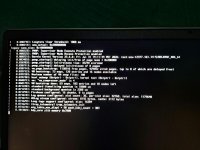
Ryzen 3 3250U (Dali) laptop: Monterey boots, Ventura/Sonoma/Tahoe freeze at "kdp_core zlib memory 0x7000"

Zen

New member
AMD OS X Member
Oct 26, 2026
7
0
1
CPU:
ryzen 3 3250U
Hardware: Dell Inspiron 15 3525, Ryzen 3 3250U (2C/4T, Dali), Vega 3 iGPU, 8 GB RAM, KIOXIA KBG50ZNS NVMe, BIOS 1.36.0 (InsydeH2O, no CSM, Above 4G already on, SATA = AHCI, Secure Boot off).

Working: Monterey 12.7.6 runs with OpenCore REL-109 and AMD_Vanilla patches (core count 02, Shaneee PAT patches, DummyPowerManagement, NootedRed, ForgedInvariant, RestrictEvents).

Problem: Ventura 13.7.x (Darwin 22.6.0), Sonoma 14.6 (23.6.0) and Tahoe all stop dead at kdp_core zlib memory 0x7000, with no panic and no further output.
Verified: OpenCore log shows MAT support is 1, all AMD kernel patches applied successfully, kexts injected.

Tried without change: every Booter quirk set, with and without custom ACPI/SSDTs and HPET patches, minimal kexts (Lilu, VirtualSMC, WhateverGreen only), algrey vs Shaneee PAT patches, cpus=1, npci=0x2000, the IOPCIIsHotplugPort patch enabled, SecureBootModel Default/Disabled, and an OpCore Simplify-generated EFI.
Has anyone gotten Ventura or newer to boot on a Dali/Picasso (Ryzen 3 3250U/3200U, Athlon) dual-core laptop? Any patch or quirk I'm missing?
 

Attachments

  • WhatsApp Image 2026-10-26 at 10.55.36.jpeg
    WhatsApp Image 2026-10-26 at 10.55.36.jpeg
    75.3 KB · Views: 1
No EFI folder attached to your last post.
 
Where?
Again nothing attached to the post above.
How are you trying to attach the EFI folder?​
You need to Zip/compress the folder and attach the zipped container for it to work.​

Questions:
1. How have you configured your AMD IGPU?
How much VRAM have you allocated to the IGPU, it needs to a minimum of 1G to work without any issues in macOS.​
2G would be better, and is the base limit I use on any of my Hacks. But as you only have 8G RAM you will probably need the 7G RAM to run macOS.​

2. Have you used Smokeless UMAF to edit the VRAM (UMA buffer size) allocation?
I have used it without issue on a couple of Lenovo AMD laptop and a couple of HP Mini Desktop hacks.​

 
Where?
Again nothing attached to the post above.
How are you trying to attach the EFI folder?​
You need to Zip/compress the folder and attach the zipped container for it to work.​

Questions:
1. How have you configured your AMD IGPU?
How much VRAM have you allocated to the IGPU, it needs to a minimum of 1G to work without any issues in macOS.​
2G would be better, and is the base limit I use on any of my Hacks. But as you only have 8G RAM you will probably need the 7G RAM to run macOS.​

2. Have you used Smokeless UMAF to edit the VRAM (UMA buffer size) allocation?
I have used it without issue on a couple of Lenovo AMD laptop and a couple of HP Mini Desktop hacks.​

Hi Edhawk, thanks for the reply, and sorry about the attachments. They kept disappearing when I clicked Post, so I'm posting a link to the files instead: https://drive.google.com/file/d/1ouXM4gCPXMfDcPBWI_8uLYujzMZSItn8/view?usp=drive_link. It has my config.plist, the ACPI folder and a list of the kexts and versions. I removed the serial, MLB, UUID and ROM first.

To answer your questions:

1. I haven't changed the iGPU memory allocation. This is a Dell Inspiron 15 3525 with an InsydeH2O BIOS (version 1.36.0). The Advanced tab only shows things like Integrated NIC, USB Emulation, SATA Operation and battery options. There is no UMA Frame Buffer option, so I don't know what the iGPU is currently set to. Windows GPU-Z reports Above 4G Decode as enabled and CSM as disabled, and the BAR sizes are 256 MB and 2 MB.

2. I haven't used Smokeless UMAF yet. I'm a bit cautious about changing hidden BIOS settings on a laptop with only 8 GB of RAM. If you think it's worth trying, I'd set only iGPU Configuration to UMA_SPECIFIED and UMA Frame Buffer Size to 2G, and I'd photograph the original values first.

One thing I wanted to ask. The freeze happens very early, at kdp_core zlib memory 0x7000, before any graphics kext loads. I get the same freeze with NootedRed removed from the EFI (only Lilu, VirtualSMC and WhateverGreen loaded). Do you think the UMA size could really affect this stage?

For reference, Monterey 12.7.6 boots and runs fine with this EFI. Ventura 13.7.x (kernel 22.6.0), Sonoma 14.6 (23.6.0) and a Tahoe EFI from OpCore Simplify all stop at the same line. I've also tried npci=0x2000, the IOPCIIsHotplugPort patch enabled, Shaneee versus algrey PAT patches, and different Booter quirk sets. My OpenCore log shows MAT support is 1 and all kernel patches applying successfully.

Thanks again for your help.
 
Access denied on Google Drive. You need to provide a link that isn't access protected, i.e. one you share with others.

Better yet, zip the EFI folder and attach a copy here, like I requested.
 
Access denied on Google Drive. You need to provide a link that isn't access protected, i.e. one you share with others.

Better yet, zip the EFI folder and attach a copy here, like I requested.
Hi Edhawk,

Sorry about the access issue earlier. I have updated the Google Drive permissions, so the link is now public and available to download.

I tried to zip the EFI folder and attach it here like you asked, but the zip file is around 9MB. It seems that is too large for the forum's attachment limit, because the file keeps disappearing when I try to post it.

Here is the working Google Drive link instead:
Let me know if you can download it now.
 
I have downloaded the EFI folder and I am currently having a look through the folders contents.

The first thing I notice is that you have too many kexts in your setup for a Tahoe installation. It is normal to use a minimal set of kexts when installing Tahoe, as non-essential kexts can throw up issues during the installation that they don't during a normal boot, i.e. once the OS has been installed.

The essential kexts in your case would be these.
  1. Lilu.kext
  2. VirtualSMC.kext
  3. AppleMCEReporterDisabler.kext
  4. SMCBatteryManager.kext
  5. VoodooI2C.kext
  6. VoodooI2CHID.kext
  7. VoodooPS2Controller.kext
Plus your laptop's Ethernet kext, assuming your laptop contains an Ethernet port, some don't.

Your USBToolBox.kext and UTBMap.kext while fine in Sequoia and earlier versions of macOS, isn't compatible with Tahoe. Apple introduced a new USB port numbering and naming convention when Tahoe was released and UTBMap.kext hasn't been updated to take this into account.

You need to create a new kext, USBMap.kext with the latest version of Corpnewt's USBMap script or USBPorts.kext using Hackintool's USB tab version 4.14, 4.15 or newer. Both of these options will create a Tahoe compatible USB kext from your current UTBMap.kext configuration. This should be undertaken in an older version of macOS, such as Monterey, assuming you still have access to the OS.

You will notice that I didn't include NootedRed.kext in the list above. That is because it is sometimes necessary to disable or remove this kext when installing Sequoia &/or Tahoe. It can be enabled/added back to the OC setup once you have reached the Desktop. Having it enabled during the installation can cause unnecessary issues, which we want to minimise.

Same goes for a number of the other kexts I omitted from the list above, especially AMDRyzenCPUPowerManagement.kext and any Sensor kexts. These are really not needed during the OS installation and can be added back once the OS has been installed.

You have some work to do.
 
I have downloaded the EFI folder and I am currently having a look through the folders contents.

The first thing I notice is that you have too many kexts in your setup for a Tahoe installation. It is normal to use a minimal set of kexts when installing Tahoe, as non-essential kexts can throw up issues during the installation that they don't during a normal boot, i.e. once the OS has been installed.

The essential kexts in your case would be these.
  1. Lilu.kext
  2. VirtualSMC.kext
  3. AppleMCEReporterDisabler.kext
  4. SMCBatteryManager.kext
  5. VoodooI2C.kext
  6. VoodooI2CHID.kext
  7. VoodooPS2Controller.kext
Plus your laptop's Ethernet kext, assuming your laptop contains an Ethernet port, some don't.

Your USBToolBox.kext and UTBMap.kext while fine in Sequoia and earlier versions of macOS, isn't compatible with Tahoe. Apple introduced a new USB port numbering and naming convention when Tahoe was released and UTBMap.kext hasn't been updated to take this into account.

You need to create a new kext, USBMap.kext with the latest version of Corpnewt's USBMap script or USBPorts.kext using Hackintool's USB tab version 4.14, 4.15 or newer. Both of these options will create a Tahoe compatible USB kext from your current UTBMap.kext configuration. This should be undertaken in an older version of macOS, such as Monterey, assuming you still have access to the OS.

You will notice that I didn't include NootedRed.kext in the list above. That is because it is sometimes necessary to disable or remove this kext when installing Sequoia &/or Tahoe. It can be enabled/added back to the OC setup once you have reached the Desktop. Having it enabled during the installation can cause unnecessary issues, which we want to minimise.

Same goes for a number of the other kexts I omitted from the list above, especially AMDRyzenCPUPowerManagement.kext and any Sensor kexts. These are really not needed during the OS installation and can be added back once the OS has been installed.

You have some work to do.
Hi Edhawk, thanks for going through the EFI and for the kext advice. I followed it and rebuilt the Tahoe EFI with only: Lilu, VirtualSMC, AppleMCEReporterDisabler, SMCBatteryManager, VoodooI2C (with its plugins), VoodooI2CHID and VoodooPS2Controller (plus AMFIPass, which OpCore Simplify added for Tahoe). I turned off NootedRed, ForgedInvariant, RestrictEvents, AppleALC, NVMeFix, all the sensor kexts, rtw88, USBToolBox and UTBMap.

It still freezes at the same place. The photo is attached. The kernel is Darwin 25.6.0 (xnu-12377.161.14), and the last line is: kdp_core zlib memory 0x7000. There is no panic and nothing more is printed.

This is the same line where Ventura 13.7.x (22.6.0) and Sonoma 14.6 (23.6.0) stop. Monterey 12.7.6 (21.6.0) boots fine with the same hardware. The freeze comes before any kext loads, and I got the same freeze earlier with only Lilu, VirtualSMC and WhateverGreen enabled, so I don't think the kexts are causing it.

Things I have already tried without any change: npci=0x2000, the IOPCIIsHotplugPort patch enabled, Shaneee versus algrey PAT patches, different Booter quirk sets (including the old firmware combination), no custom SSDTs, and SecureBootModel Default and Disabled. The OpenCore log shows MAT support is 1 and that all the kernel patches applied successfully.

You mentioned the iGPU VRAM. My Dell BIOS has no UMA Frame Buffer option, so I haven't changed it yet. Do you think I should try Smokeless UMAF and set UMA to 2G, even though the freeze happens this early? Or is there anything else you would check first?

Thanks again for your time.
 

Attachments

  • WhatsApp Image 2026-10-29 at 10.28.22.jpeg
    WhatsApp Image 2026-10-29 at 10.28.22.jpeg
    518.1 KB · Views: 0
✖
  AdBlock Detected
Sure, ad-blocking software does a great job at blocking ads, but it also blocks some useful and important features of our website. For the best possible site experience please take a moment to disable your AdBlocker.