SMBIOS for Tahoe 26 Beta 3

treyvaud

New member
AMD OS X Member
Mar 4, 2025
24
0
1
Australia
CPU:
AMD ryzen 7 5800h | Radeon Vega 8 | 16GB DDR4 RAM | 512GB SSD NVME HDD
Hello lovely people,
I've managed to get almost everything working, but VDA - Decoder Failed is showing up in Hackintool. I've tried macpro1,1 imac20,1 macpro6,1 macpro7,1 and macbookpro16,3 with the same effect. Apart from that, most things seem to be working. Please help?!

Graphics occasionally freeze - but that's it. What am I missing here?

Anthony :)


AMD RYZEN 7 5800H
Radeon Vega 8
16GB DDR4 RAM
500GB SSD NVME
 

Attachments

As you are using a laptop you should be using the MacBookPro16,4 SMBIOS. There are a very limited number of devices that will support Tahoe, MacPro7,1, iMac20,x and MacBookPro16,x.

You will not get VDA Decoding working with your AMD IGPU graphics, doesn’t matter what SMBIOS you use.
 
As you are using a laptop you should be using the MacBookPro16,4 SMBIOS. There are a very limited number of devices that will support Tahoe, MacPro7,1, iMac20,x and MacBookPro16,x.

You will not get VDA Decoding working with your AMD IGPU graphics, doesn’t matter what SMBIOS you use.
Thank you. I'm using a mini PC, not a laptop hence I wasn't sure. Thanks for the heads up, assuming I will still need to map all my USB ports correctly?
 
Yes, mapping the USB ports is essential to getting the mini PC working at its best.

You might need to check the NVMe drive in the Mini PC is compatible with macOS. As some users had issues with the drives installed by the manufacturer.
 
  • Like
Reactions: treyvaud
Yes, mapping the USB ports is essential to getting the mini PC working at its best.

You might need to check the NVMe drive in the Mini PC is compatible with macOS. As some users had issues with the drives installed by the manufacturer.

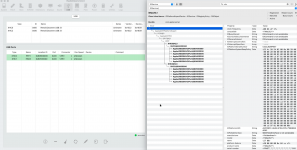
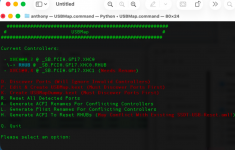
Thank you. The NVMe drive is fine, but my USB ports aren't. I can't seem to get the USB3 port working when in MacOS - are there any pointers for getting the mapping correct? I used the usbmap in windows and mapped the ports correctly, but even after adding the kext and rebooting it didn't seem to make any difference. I've attached a couple of screenshots.
 

Attachments

  • Screenshot 2025-08-02 at 2.56.56 am.png
    Screenshot 2025-08-02 at 2.56.56 am.png
    473.1 KB · Views: 20
  • Screenshot 2025-08-02 at 2.57.17 am.png
    Screenshot 2025-08-02 at 2.57.17 am.png
    83.4 KB · Views: 20
Post a copy of your whole EFI folder. Just make sure you redact/delete the serial number from the config.plist before you post a copy here.

Which make and model is your NVMe SSD? I am not sure I have seen any MAXIO Technology drives recommended for use in macOS.

Your WiFi is an Intel AX200NGW card, which should work with the OpenIntelWireless Itlwm. kext and Heliport app in Sonoma and Sequoia.
 
Post a copy of your whole EFI folder. Just make sure you redact/delete the serial number from the config.plist before you post a copy here.

Which make and model is your NVMe SSD? I am not sure I have seen any MAXIO Technology drives recommended for use in macOS.

Your WiFi is an Intel AX200NGW card, which should work with the OpenIntelWireless Itlwm. kext and Heliport app in Sonoma and Sequoia.
Thanks Ed! Everything else is working fine, it's just the USB mapping which doesn't seem to be working.
 

Attachments

This is a screenshot showing your current EFI folder contents.
Screenshot 2025-08-01 at 21.58.30.png Current EFI contents

This is how I would configure the EFI folder contents if this were my system.
Screenshot 2025-08-01 at 22.00.23.png Revised EFI contents

The differences are in the ACPI and Kexts folders. Where I have removed SSDT's and kexts you don't need with your Mini PC hack. Most of the elements removed were for Laptop systems, plus an obsolete Bluetooth kext.

The GenericXHCI.kext and SSDT-USB-Reset.aml table were probably messing with your USB configuration.

I have made a few changes in the config.plist, which I think would be more in line with what you need. Just do a side by side comparison of the current and revised config.plist to see which entries have been changed.

Try booting this revised EFI on a spare USB pen drive. See if it gets you any further with your USB config.

Remember to add your SMBIOS data back in to the config.plist.

As a comparison this is a screenshot showing the contents of the EFI I use for my Gen Machine 7000 running Sequoia 15.6.
Screenshot 2025-08-01 at 22.05.37.png Gen Machine 7000 EFI contents
 

Attachments

Thank you. I've run the USBtoolbox from windows to map all the ports and followed the instructions to the letter, and now when I reboot with the kexts in the folder and config.plist none of my USB ports work..... Is there any guidance available please?
 
What happens when you disable or remove your UTBMap.kext and just use the GenericXHCI.kext? Do your USB ports work?
 
What happens when you disable or remove your UTBMap.kext and just use the GenericXHCI.kext? Do your USB ports work?
Hey Edhawk, I bit the bullet and rebuilt the entire thing from scratch (again). I have most of the USB ports working now and most things are working. I've also run SSDT time from MacOS and patched the IRQ's, and combined them into the EFI

1. I have mapped the USB ports in windows, do I also need to map them in MacOS?
2. I have all the PCI addresses in MacOS - do I need to add these to my config.plist?

Cheers,

A
 

Attachments

No, is the answer to both questions.
 
No, is the answer to both questions.
Thanks, though I'm not sure what I'm missing here?

I would seem to need the following AML files:
SSDT-HPET
SSDT-EC
SSDT-USBX
SSDT-PLUG
SSDT-USB-RESET
SSDT-XOSI


I am doing the mapping correctly using USBTool in windows, and have the correct type of port assigned, then when I boot into Mac, the USB ports screw up and half of them don't work. If I go intohackintool then I don't see much, but now I see all the ports in ioregister.

What would be the correct order to perform the building of the EFI/OC folders so everything works correctly please? I've also got USBMap in MacOS reporting ports incorrectly, and when I open it up, it tells me I need to rename my XHC1

A
 

Attachments

  • Screenshot 2025-08-08 at 4.27.04 pm.png
    Screenshot 2025-08-08 at 4.27.04 pm.png
    881.3 KB · Views: 16
  • Screenshot 2025-08-08 at 4.28.44 pm.png
    Screenshot 2025-08-08 at 4.28.44 pm.png
    329.2 KB · Views: 17
  AdBlock Detected
Sure, ad-blocking software does a great job at blocking ads, but it also blocks some useful and important features of our website. For the best possible site experience please take a moment to disable your AdBlocker.