Hi everyone,
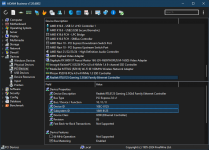
Recently I just installed a hackintosh on my rig with the following hardware:
With the power of open-sourced, I managed to pull source code of LucyRTL8125Ethernet kext and compile myself a debug build of it with additional logging for diagnostic on why it failed to recognized my RTL8125 NIC.
I found out that during the initialization phase of LucyRTL8125Ethernet kext, it will attempt to map RTL8125 hardware MMIO region #2 with:
Source: https://github.com/Mieze/LucyRTL812...cyRTL8125Ethernet/LucyRTL8125Hardware.cpp#L77
Equivalent Linux code:
Source: https://github.com/notpeelz/r8125/blob/80c1b2504dd08ea7fb0e0685510ba26cffec3d56/src/r8125_n.c#L15770
But somehow on my hackintosh machine, the kext was not able to obtain TxConfig register from the NIC MMIO region with:
Source: https://github.com/Mieze/LucyRTL812...yRTL8125Ethernet/LucyRTL8125Hardware.cpp#L149
Equivalent Linux code:
Source: https://github.com/notpeelz/r8125/blob/80c1b2504dd08ea7fb0e0685510ba26cffec3d56/src/r8125_n.c#L7530
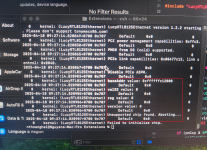
And it caused the kext to fail the initialization phase.
Recently I just installed a hackintosh on my rig with the following hardware:
- Mobo: ASRock X670E Pro RS
- CPU: Ryzen 7 7700
- GPU: RX 6900 XT
With the power of open-sourced, I managed to pull source code of LucyRTL8125Ethernet kext and compile myself a debug build of it with additional logging for diagnostic on why it failed to recognized my RTL8125 NIC.
I found out that during the initialization phase of LucyRTL8125Ethernet kext, it will attempt to map RTL8125 hardware MMIO region #2 with:
C++:
baseMap = provider->mapDeviceMemoryWithRegister(kIOPCIConfigBaseAddress2, kIOMapInhibitCache);Equivalent Linux code:
C:
ioaddr = ioremap(pci_resource_start(pdev, 2), pci_resource_len(pdev, 2));But somehow on my hackintosh machine, the kext was not able to obtain TxConfig register from the NIC MMIO region with:
C++:
val32 = ReadReg32(TxConfig);Equivalent Linux code:
C:
val32 = RTL_R32(tp, TxConfig);And it caused the kext to fail the initialization phase.