

Hi there, I'm trying to install Tahoe 26 to another hard disk I've with my USB stick but it fails, i'm stuck on the prohibited sign
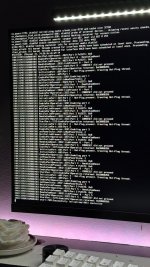
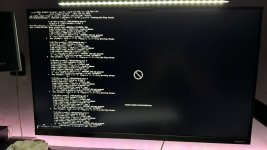
At the beginning i receive the prohibited sign instantly at picking at OC, switched from
I've created the
Any ideas?
My setup:
Gigabyte B550 AORUS ELITE AX V2
AMD Ryzen 7 5700X - Thermaltake Contac Silent 12
16GB RAM XPG Hunter DDR4 @ 3200 MHz
Sapphire Nitro+ RX 6700 XT 12G
WD Blue SN580 1TB NVMe
XPG S40G Spectrix 256GB NVMe
Corsair Carbide 100R
Windows 11 & macOS Sequoia (OpenCore 1.0.6)
---
My EFI folder is attached
Thanks
At the beginning i receive the prohibited sign instantly at picking at OC, switched from
iMacPro1,1 to MacPro7,1 and that was solved (and also changed the serial numbers) but now i've that issue with the prohibited sign after the verbose logsI've created the
USBMap.kext with the utility on Windows but not worked Any ideas?
My setup:
Gigabyte B550 AORUS ELITE AX V2
AMD Ryzen 7 5700X - Thermaltake Contac Silent 12
16GB RAM XPG Hunter DDR4 @ 3200 MHz
Sapphire Nitro+ RX 6700 XT 12G
WD Blue SN580 1TB NVMe
XPG S40G Spectrix 256GB NVMe
Corsair Carbide 100R
Windows 11 & macOS Sequoia (OpenCore 1.0.6)
---
My EFI folder is attached
Thanks