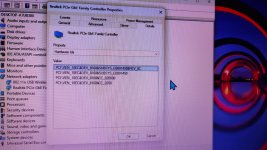
RealtekRTL8111 not working on my Gigabyte A320M S2H with Amd Ryzen 3 2200G even bigsur it was working fine but incase of monterey, ventura and sonoma it's not working anymore
anyone can help me.
Attachments
WhatsApp Image 2024-08-30 at 21.02.05_8e909b91.jpg
Navigated to your /EFI/OC/Kexts folder, and copied the kext to the Kexts folder.
Opened your config.plist and confirmed the RealtekRTL8111.kext was present and enabled in the config's Kernel > Add section.
Saved your config.plist.
Rebooted your Hack
While on the OC boot screen you selected the ResetNvram entry and the system automatically rebooted.
You then booting OC, booted in to macOS and found your Ethernet connection wasn't working.
Yes?
Did you ensure that your Ethernet connection was present on the System Settings > Network preference pane?
If it wasn't present, did you 'Add' an Ethernet device to the Network pane?
MacOS isn't like Windows which would automatically add the network device and look for a driver. You sometimes have to do some of the work yourself, especially with a Hack.
Are you using OpenCore Legacy Patcher? As that has been known to have an adverse effect on some Ethernet devices.
This site uses cookies to help personalise content, tailor your experience and to keep you logged in if you register.
By continuing to use this site, you are consenting to our use of cookies.
Sure, ad-blocking software does a great job at blocking ads, but it also blocks some useful and important features of our website. For the best possible site experience please take a moment to disable your AdBlocker.