
Solved please delete.
- Thread starter alliance
- Start date
-
Hello Guest. Before you post check the Troubleshooting guide here, Dortania Troubleshooting
You are using an out of date browser. It may not display this or other websites correctly.
You should upgrade or use an alternative browser.
You should upgrade or use an alternative browser.

According to the specifications page for your MSI motherboard you should have a maximum of 17 ports active in your USB configuration. The ports are as listed below.
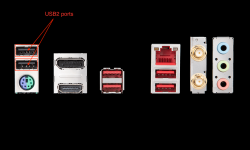 Rear I/O plate with 2 x USB2 ports highlighted.
You would probably be better served using SSDT-EC-USBX-AMD.aml table in place of the other/similar named tables you have mentioned. Copy attached below.
For the initial macOS installation you don't need to add any other ACPI tables (SSDTs) for your B450 system.
AMD- Chipset
- 2 x USB 3.1 Gen 1 (SuperSpeed USB 5Gbps) Type-A ports on the back panel
- 4 x USB 2.0 (High-speed USB) ports (2 Type-A ports on the back panel, 2 ports available through the internal USB 2.0 connector)
- 1 x Internal USB2.0 port served through the M.2 WiFi connector, used by the bluetooth module.
AMD - CPU
- 4x USB 3.1 Gen 1 (SuperSpeed USB) ports (2 Type-A ports on the back panel, 2 ports available through the internal USB 3.1 Gen 1 connector)
Rear I/O plate with 2 x USB2 ports highlighted.You would probably be better served using SSDT-EC-USBX-AMD.aml table in place of the other/similar named tables you have mentioned. Copy attached below.
For the initial macOS installation you don't need to add any other ACPI tables (SSDTs) for your B450 system.
