
No wifi with fenvi t919 on ASUS ROG Strix X570-F motherboard running Sequoia
- Thread starter Torch
- Start date
-
Hello Guest. Before you post check the Troubleshooting guide here, Dortania Troubleshooting
You are using an out of date browser. It may not display this or other websites correctly.
You should upgrade or use an alternative browser.
You should upgrade or use an alternative browser.

You need to use OpenCore Legacy Patcher to apply the Broadcom WiFi Root Patches as the Fenvi T919 lost native support with the release of Sonoma.

 github.com
You need to add the three kexts listed below to your /EFI/OC/kexts folder, with a corresponding entry for the kexts and plugins in your config.plist. Kexts attached below.
You need to ensure that SecureBootModel is set to 'Disabled'
You need to change crs-active-config (SIP) so it is set to <03080000>
Releases · dortania/OpenCore-Legacy-Patcher
Experience macOS just like before. Contribute to dortania/OpenCore-Legacy-Patcher development by creating an account on GitHub.
github.com
You need to add the three kexts listed below to your /EFI/OC/kexts folder, with a corresponding entry for the kexts and plugins in your config.plist. Kexts attached below.
- AMFIPass.kext v1.4.1
- IO80211FamilyLegacy.kext
- IOSkywalkFamily.kext v1.2.0
You need to ensure that SecureBootModel is set to 'Disabled'
You need to change crs-active-config (SIP) so it is set to <03080000>
Attachments


I will try this tonight. Thank you Edhawk. Btw which card nic card are you currently using?
You need to use OpenCore Legacy Patcher to apply the Broadcom WiFi Root Patches as the Fenvi T919 lost native support with the release of Sonoma.
Releases · dortania/OpenCore-Legacy-Patcher
Experience macOS just like before. Contribute to dortania/OpenCore-Legacy-Patcher development by creating an account on GitHub.
You need to add the three kexts listed below to your /EFI/OC/kexts folder, with a corresponding entry for the kexts and plugins in your config.plist. Kexts attached below.
You need to block the IOskywalkFamily.kext that comes with Sequoia, so the kext from Ventura will work.
- AMFIPass.kext v1.4.1
- IO80211FamilyLegacy.kext
- IOSkywalkFamily.kext v1.2.0
You need to ensure that SecureBootModel is set to 'Disabled'
You need to change crs-active-config (SIP) so it is set to <03080000>
Last edited:
I have quite a few native Apple Broadcom WiFi/BT cards, see the list below. I own one or probably more of each card, with a box of spares in case I need to replace one or fix someone else’s system.
They all work.
See this link for more information about the WiFi options for a Hackintosh system.
- BCM943602CDP
- BCM94360CD
- BCM94360CS2
- BCM943602CS
- BCM94360NG
- BCM943602
- BCM94352Z
- BCM94350ZAE
They all work.
See this link for more information about the WiFi options for a Hackintosh system.
Do you have a link for this adapter? Also, did you have to still patch it like the Fenvi 919?I have a BCM4360CS2 (0x14E443BA) card on a PCIe x1 adapter in my Asus X570 system.
Type of PCIe x1 adapter I use with the BCM94360CS2 card.
Last edited:
Yes, you still need to use OpenCore Legacy Patcher with the Broadcom cards listed above. Some of the M.2 cards also required kexts for the Bluetooth to work.
Link for adapter card on eBay.co.uk
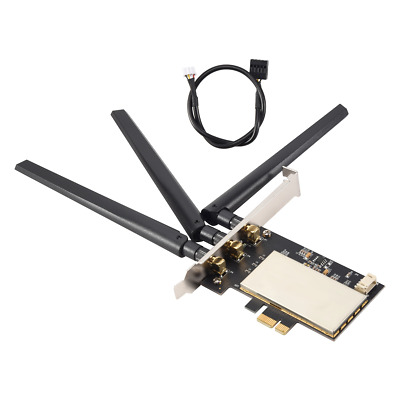
Link for adapter card on eBay.co.uk
for Broadcom Bcm94360CSAX Bcm943602CS Bcm94331CSAX WLAN Card Desktop PCI-E8511 | eBay
High quality PCB Board. 1 Full-grade board. 1 Shield cover. Compatible for PCIE-1X, PCIE-16X Solt. 3 Antenna. Weight: 56.3g.
www.ebay.co.uk
Another PCIe adapter link, this one is available from Amazon UK.
Link for Apple Broadcom BCM943602CS card on eBay.co.uk
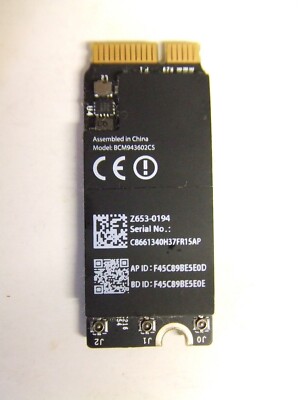
Link for Apple Broadcom BCM943602CS card on eBay.co.uk
APPLE MACBOOK PRO A1502 2013 2015 WIFI WIRELESS AIRPORT CARD BCM943602CS | eBay
Wifi Wireless Airport Card BCM943602CS. Apple MacBook Pro A1502 2015. and has been removed from a MacBook which had other faults. This component is a genuine Apple part - it is tested, working OK. Tested and working OK.
www.ebay.co.uk