Solved Need Help No MacOS in OpenCore Menu Boot

jb971

New member
AMD OS X Member
Sep 23, 2021
9
1
3
France
CPU:
Ryzen 3700x
Hi, I'm french, sorry for my english.

Hardware :
CPU : AMD Ryzen 7 3700x
Motherboard : Asus TUF Gaming B550 plus
Ram : Corsair Vengeance LPX 3200
Graphic Card : Msi Radeon RX 460 4 GB
Wifi + Bluetooth : Gigabyte with Intel AX 200

I followed the OpenCore guide for setup.
And I no longer count the number of time spent starting over.
I manage to boot into OpenCore but I can't see the BigSur partition.
I looked at the forums and the problems referenced on the OpenCore site and I did correct a few parameters.
If anyone can check what's wrong.
I thank him in advance.
 

Attachments

I've seen this exact EFI before, it's shared from another user. Kexts that aren't listed in the kext folder and kexts that are listed that aren't in the kext folder.

Remake your own EFI folder using the guide. You'll face less issues this way.
 
I've seen this exact EFI before, it's shared from another user. Kexts that aren't listed in the kext folder and kexts that are listed that aren't in the kext folder.

Remake your own EFI folder using the guide. You'll face less issues this way.
Thanks for answer, I have to download and configure everything myself. I had tried EFI close to my hardware but without success. I'll be looking for the kexts.
 
You can try with this. You may need to adjust the SMBios though. Also double check your BIOS settings as per the guide. Mainly that SATA is set to AHCI.
 

Attachments

You can try with this. You may need to adjust the SMBios though. Also double check your BIOS settings as per the guide. Mainly that SATA is set to AHCI.
Thanks a lot, i try tomorrow.
Bye!
 
Woow i see Mac partition !!
Now i have a blakscreen after loading...
Its normal ?
 

Attachments

  • IMG_20210927_195605.jpg
    IMG_20210927_195605.jpg
    3.9 MB · Views: 19
Try with this. I've altered the SMBios.
 

Attachments

What display connector are you using?
 
Ok so that's not an issue. May seem strange but move the mouse to the top of the screen and click a few times. I've seen this in the past and that seems to force the UI to load.
 
I've read it can be due to the language the installer is trying to use. I've set this to French in the config. On first boot to OpenCore reset the NVRAM then try booting the installer.
 

Attachments

Yes, i was able to install with this configuration, now i have a bootloop, do i have to put the EFI folder on the ssd?
 
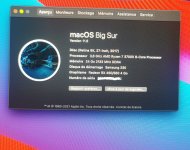
Its good for me !
I Disabled Securebootmodel on config.plist.
Boot normally now.
Thanks a lot, i try finish alone.
 

Attachments

  • IMG_20210929_193103_edit_114349196236196.jpg
    IMG_20210929_193103_edit_114349196236196.jpg
    3.2 MB · Views: 15
  • Like
Reactions: Shaneee
  AdBlock Detected
Sure, ad-blocking software does a great job at blocking ads, but it also blocks some useful and important features of our website. For the best possible site experience please take a moment to disable your AdBlocker.