
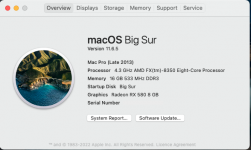
Is it ok that my graphics card (RX580) is not showing up on the About this Mac page ?
- Thread starter Isti.F
- Start date
-
Hello Guest. Before you post check the Troubleshooting guide here, Dortania Troubleshooting
You are using an out of date browser. It may not display this or other websites correctly.
You should upgrade or use an alternative browser.
You should upgrade or use an alternative browser.

If it is installed correctly, you have Lilu.kext and WhateverGreen.kext installed, and the RX 580 has a compatible Device ID it should show automatically.
What does the System Information > Graphics/Display report show?
Example of the System Information > Graphics/Displays report is shown below:
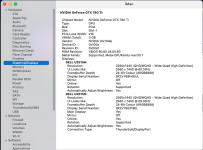
What does the System Information > Graphics/Display report show?
Example of the System Information > Graphics/Displays report is shown below:
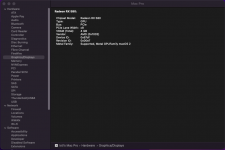
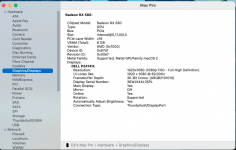
No your display is not showing as being connected to the RX580. There should be a section below the one seen, with details of your display. As shown in the screenshots below.
How are you connecting the display to the RX580, i.e. which connector(s) are you using, DisplayPort, HDMI, DVI or VGA?
How are you connecting the display to the RX580, i.e. which connector(s) are you using, DisplayPort, HDMI, DVI or VGA?
Your RX580 seems to be running at x8, when it is installed in the only x16 slot on your motherboard. Have you checked to ensure your graphics are setup correctly in your bios. With the PCIe slot/card selected as the default graphics option. Any Integrated graphics options should be disabled or set to the discrete card.
I think your motherboard requires an AMD APU to be present for the system to run the discrete graphics card at PCIe 3.0 and x16, at least that is what I understand when reading the information on the Gigabyte specification page for your motherboard.

You are of course connecting the display to one of the RX580's display-out connectors, yes?
You aren't connecting the display to the VGA or DVI connector on the rear I/O plate (motherboard)?
I think your motherboard requires an AMD APU to be present for the system to run the discrete graphics card at PCIe 3.0 and x16, at least that is what I understand when reading the information on the Gigabyte specification page for your motherboard.
You are of course connecting the display to one of the RX580's display-out connectors, yes?
You aren't connecting the display to the VGA or DVI connector on the rear I/O plate (motherboard)?
Have you checked that you have the correct bios settings for running macOS?
Have you added any “fixes” to your OC setup? Did you remove them when they failed to work?
The RX580 doesn’t require anything but Lily.kext and WhateverGreen.kext for it to work in macOS.
Have you added any “fixes” to your OC setup? Did you remove them when they failed to work?
The RX580 doesn’t require anything but Lily.kext and WhateverGreen.kext for it to work in macOS.
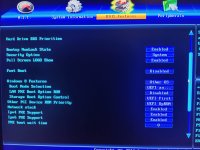
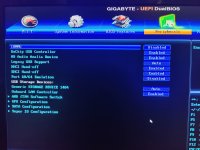
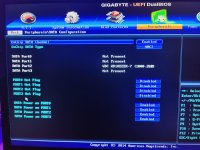
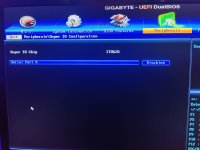
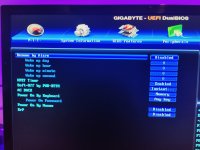
Can you post a screenshot showing the GFX Configuration tab in your bios.
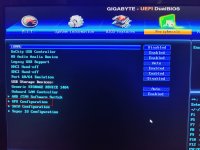 GFX Configuration option highlighted
GFX Configuration option highlighted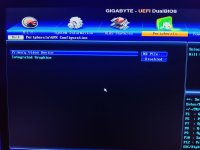
OK, that look fine.
Can you post a copy of your OC EFI folder so I can see what you are using.
Remember to remove/delete the Serial Number from your config.plist before you post a copy online.
Can you post a copy of your OC EFI folder so I can see what you are using.
Remember to remove/delete the Serial Number from your config.plist before you post a copy online.
EFI folder looks fine, nothing in the folder that would cause the GPU not to show or function correctly.
If you want to get a working SMBIOS, you should use Corpnewt's GenSMBIOS script. For your setup I would recommend MacPro6,1.

 github.com
To generate a new SMBIOS Serial etc. do the following:
 checkcoverage.apple.com
You just need to copy and paste the Serial Number in to the top box on the Apple Support page and then enter the Text shown in the box below.
What you want to see is a 'Negative' response from the Apple Support page, as this means the Serial Number you have entered is not being used by a real Mac Pro. As shown below.
 Negative response on Apple Support page, this is what you want to see.
Hope this helps.
If you want to get a working SMBIOS, you should use Corpnewt's GenSMBIOS script. For your setup I would recommend MacPro6,1.
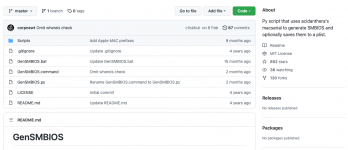
GitHub - corpnewt/GenSMBIOS: Py script that uses acidanthera's macserial to generate SMBIOS and optionally saves them to a plist.
Py script that uses acidanthera's macserial to generate SMBIOS and optionally saves them to a plist. - corpnewt/GenSMBIOS
github.com
To generate a new SMBIOS Serial etc. do the following:
- Select the Green 'Code' button on the page linked above.
- Select Download Zip to obtain a copy of the GenSMBIOS folder.
- This will copy the GenSMBIOS-Master folder to your downloads folder.
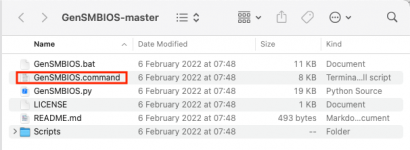
- Open the GenSMBIOS folder and select the GenSMBIOS.command,
- Right-click on the GenSMBIOS.command and select open.
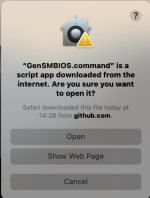
- The system will ask if you really want to open this file, select Open, from the window shown below.
- Right-click on the GenSMBIOS.command and select open.
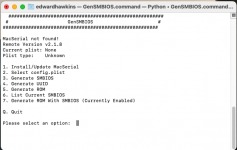
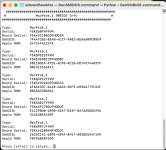
- This will open a new Terminal window, as shown below.
- You need to select option '3' Generate SMBIOS.
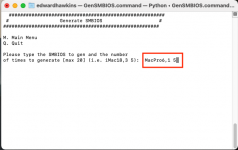
- This will ask you to enter the Apple system and number of sets of SMBIOS data to generate.
- For your system you should use MacPro6,1 5, as shown below.
- This will then generate 5 SMBIOS data sets for the Mac Pro 6.1 system, as shown below.
- For your system you should use MacPro6,1 5, as shown below.
- You can now test the Serial Number from the first SMBIOS data set on the Apple Support page linked below.
Check Your Service and Support Coverage - Apple Support
Check your Apple warranty status. Enter a serial number to review your eligibility for support and extended coverage.
You just need to copy and paste the Serial Number in to the top box on the Apple Support page and then enter the Text shown in the box below.
What you want to see is a 'Negative' response from the Apple Support page, as this means the Serial Number you have entered is not being used by a real Mac Pro. As shown below.
Negative response on Apple Support page, this is what you want to see.Hope this helps.
FaceTime and Messages etc, require a working Apple iCloud account.
Apple's iCloud requires a working SMBIOS data set, which you can generate as detailed above. Don't be lazy, generate your own SMBIOS data set.
I don't understand why your graphics card is not showing correctly in About this Mac and the System Information > Graphics/Displays report. Your motherboard only has the one x16 PCIe slot, so it is not likely to be an issue with the PCIe slot you are using, your bios shows the AMD Integrated GFX is disabled and Initial graphics as the PCIe slot, you have Lilu.kext and WhateverGreen.kext in your OC/Kexts folder and both kexts are enabled in your config.plist.
While the GPU and display details are not shown in About this Mac and the system information report, this does not prevent your AMD GPU from working. I assume you can set your display to show the best resolution it supports, whether that is 1920x1080 or larger.
I can only assume the issue is related to the display connector and framebuffer the AMD GPU is using. To see if this is the case you would need to provide a copy of your IOReg.
How to Make a Copy of IOReg (Note 1)
1. IORegistryExplorer/File/Save a Copy As…. (no extension required)
2. Open file to verify (Note 2)
3. Attach to post (Note 3)
Installation
1, Open Downloads/IORegistryExplorer-SLRID_v10.6.3
2. Drag IORegistryExplorer to Applications
Notes
1. An IOReg.txt is not useful. It is not a "Copy of IOReg." Do not attach .txt files.
2. IOReg must open the file. If TextEdit opens, See Note 1.
3. Compress it (Finder/Compress ... )
Use the version of IORegistryExplorer below. Newer versions tend to corrupt the IOReg and make them unreadable.
Apple's iCloud requires a working SMBIOS data set, which you can generate as detailed above. Don't be lazy, generate your own SMBIOS data set.
I don't understand why your graphics card is not showing correctly in About this Mac and the System Information > Graphics/Displays report. Your motherboard only has the one x16 PCIe slot, so it is not likely to be an issue with the PCIe slot you are using, your bios shows the AMD Integrated GFX is disabled and Initial graphics as the PCIe slot, you have Lilu.kext and WhateverGreen.kext in your OC/Kexts folder and both kexts are enabled in your config.plist.
While the GPU and display details are not shown in About this Mac and the system information report, this does not prevent your AMD GPU from working. I assume you can set your display to show the best resolution it supports, whether that is 1920x1080 or larger.
I can only assume the issue is related to the display connector and framebuffer the AMD GPU is using. To see if this is the case you would need to provide a copy of your IOReg.
How to Make a Copy of IOReg (Note 1)
1. IORegistryExplorer/File/Save a Copy As…. (no extension required)
2. Open file to verify (Note 2)
3. Attach to post (Note 3)
Installation
1, Open Downloads/IORegistryExplorer-SLRID_v10.6.3
2. Drag IORegistryExplorer to Applications
Notes
1. An IOReg.txt is not useful. It is not a "Copy of IOReg." Do not attach .txt files.
2. IOReg must open the file. If TextEdit opens, See Note 1.
3. Compress it (Finder/Compress ... )
Use the version of IORegistryExplorer below. Newer versions tend to corrupt the IOReg and make them unreadable.
Attachments
The IOReg shows your RXC 580 as connected correctly. It also shows that you are connecting your display via a HDMI connector, from the fourth connector.
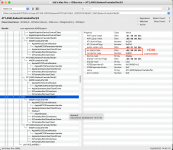
Does your RX580 have 2 x DisplayPort, 2 x HDMI and 1 x DVI connectors? As that is what is shown in your IOReg.
It shows your display connected to ATY,AMD,RadeonFramebuffer@3.
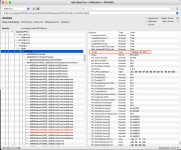
The connectors are named ATY, AMD,RadeonFramebuffer@0 to @4 (five connectors in total).
If you are connecting the display through a HDMI connector, then I would say the GPU not showing in About this Mac and the system report are purely cosmetic issues, and not to worry about them not showing correctly.
If you are not connecting the display through a HDMI connector, say if a DisplayPort is being used, then this shows that WhateverGreen.kext and the AMD framebuffer being used with your RX580 is not working correctly for your card. A custom Framebuffer may be required, but only if you are having issues with the display as it currently works.
Does your RX580 have 2 x DisplayPort, 2 x HDMI and 1 x DVI connectors? As that is what is shown in your IOReg.
It shows your display connected to ATY,AMD,RadeonFramebuffer@3.
The connectors are named ATY, AMD,RadeonFramebuffer@0 to @4 (five connectors in total).
If you are connecting the display through a HDMI connector, then I would say the GPU not showing in About this Mac and the system report are purely cosmetic issues, and not to worry about them not showing correctly.
If you are not connecting the display through a HDMI connector, say if a DisplayPort is being used, then this shows that WhateverGreen.kext and the AMD framebuffer being used with your RX580 is not working correctly for your card. A custom Framebuffer may be required, but only if you are having issues with the display as it currently works.