You have two kexts in your setup that you don't need. I would recommend you remove both kexts from your setup.
- SMCSuperIO.kext, this is for Intel systems not AMD
- USBToolBox.kext, this does nothing without the custom UTBMap.kext.
You have two kexts undertaking the same task in your Kexts folder:
- RadeonSensor.kext
- SMCRadeonGPU.kext
You don't need both of these kexts, to be honest with a Polaris (RX560) GPU you probably don't need either of them, especially not when troubleshooting boot/installation issues. I would remove both kexts and only add one back if necessary once you are successfully booting macOS. And then only if you really need to. I have a number of Polaris GPU's and have not needed either of these kexts in any of my systems.
The SSDT-EC-USBX-Desktop.aml you are using is set to work with Intel systems, not your AMD system. So I have replaced it with a compatible SSDT-EC-USBX.aml, that contains the settings required for an AMD system.
I would recommend you add ResetNvramEntry.efi to the Drivers folder, and/or CleanNvram.efi and ResetSystem.efi to the Tools folder. This is so you have an option to Clean/Reset the Nvram and reboot the system from the OpenCore Picker List or GUI boot screen. Adding all three wouldn't hurt, as they are hidden until you press the Spacebar, when the Picker List or GUI icons are visible.
Personally I prefer the OC GUI boot screen with the icons over the text based Picker List. For the GUI boot screen to work you need to add two elements and make a single change in your config.plist.
- Add OpenCanopy.efi to the Drivers folder, with a companion entry in the config.plist.
- Add a populated Resources folder, containing the Acidanthera images etc.
- Change Misc > Boot > PickerMode from 'Builtin' to 'External' in the config.plist
Having made the changes above to your config.plist I tested it with ocvalidate and a single error appears, as shown below.
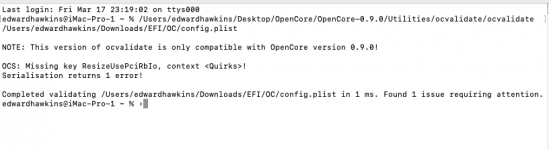
OCValidate error - Missing ResizeUsePciRbIo quirk.
By opening and searching the Sample.plist for OC 0.9.0 I have seen that this quirk is missing from the
UEFI >
Quirks section in your config.plist.
Simply copying and pasting the missing quirk from the Sample.plist to your current config.plist fixes this error.
I would suggest you try using the revised OpenCore EFI folder attached below in place of your current one. See if that gets your system booting macOS.



