Unless there is something really relevant updated for your system, which you can't do without, I would recommend sticking with your current Bios. It works, so leave it be until you actually need what the new Bios is offering.
Unless there is something really relevant updated for your system, which you can't do without, I would recommend sticking with your current Bios. It works, so leave it be until you actually need what the new Bios is offering.
Maybe Perplexity can help me i will send them everything i know about my mappings let us see
EDIT: Ya, Sir.
don't need this Boot Args i will try Tahoe MacOS Installer with -v
I almost can install fresh with Boot Stick from Tahoe it , the Update was an Issue dont know why ...
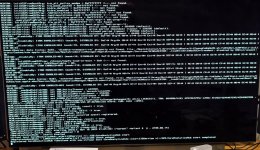
Small Update New Error from Tahoe Install, it is kind of weird.
Because under sequoia the EFI runs almost flawless unless the USB Mapping.
Here is a screenshot from the Problem
The most common issue when looking to install Tahoe is an over populated /EFI/OC/Kexts folder. The trick is to disable or delete any kexts that are not essential to getting Tahoe installed. A Kexts folder contain just these Kexts might be what you need to use.
Lilu.kext
VirtualSMC.kext
AppleMCEReporterDisabler.kext
USBPorts.kext or USBMap.kext that has been updated to work with Tahoe.
USBToolBox.kext & UTBMap.kext won’t work in Tahoe, as the UTBMap configuration lacks the new port name and number requirement for Tahoe.
The methods for generating either of other two USB kexts have been updated in their respective Application/Script so they will work with Tahoe.
You just need to make sure if you are using Sequoia that you use one of the two methods to generate a new kext based on your current configuration.
Ethernet kext (whichever one you need for your motherboard)
WhateverGreen.kext version 1.7.1d7, see link below.
I would also recommend using this Kernel patch when running a fresh/clean installation of Tahoe. As it prevents the installer from implementing FileVault encryption on your macOS drive. As this would result in you not being able to sign in to your account on the macOS login screen.
Thanks to @Slice @LockDown and @luxinhaus for perfect patch for Clover And @Luchina for Opencore video tutorial on Youtube. This tutorial aims to disable FileVault during installation or updates using patch key in Clover and OpenCore through a kernel patch, simply by adding the following keys: Cl...
This site uses cookies to help personalise content, tailor your experience and to keep you logged in if you register.
By continuing to use this site, you are consenting to our use of cookies.
Sure, ad-blocking software does a great job at blocking ads, but it also blocks some useful and important features of our website. For the best possible site experience please take a moment to disable your AdBlocker.



 , the Update was an Issue dont know why ...
