Hi,
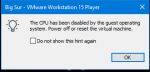
I just want to know if I can install Big Sur on an AMD machine and VMware. If so, can someone help me with this very vague error: "The CPU has been disabled by the guest operating system", the virtual machine literally shows nothing other than the Apple logo.
My EFI folder and the VMware log is attached and I use a Ryzen 5.
Any help would be appreciated (especially because I am a hackintosh newbie).
I just want to know if I can install Big Sur on an AMD machine and VMware. If so, can someone help me with this very vague error: "The CPU has been disabled by the guest operating system", the virtual machine literally shows nothing other than the Apple logo.
My EFI folder and the VMware log is attached and I use a Ryzen 5.
Any help would be appreciated (especially because I am a hackintosh newbie).
Attachments
Last edited: