Quick introduction and plans

sirLeguan

New member
AMD OS X Member
Jan 31, 2026
2
0
1
CPU:
Ryzen 5 5600
Hello,
I am currently in the middle of my semester exams and I don't know why I am bothering Introducing myself instead of prepping. But here I am.
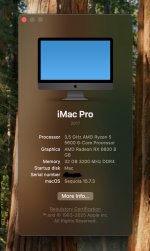
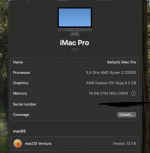
My current setup is a Ryzen 3 2200G with 16GB ram. It's the setup I ran since I built the PC back in 2019.

Last year I managed to get Ventura running on it and I use it every day in combination to my other apple 'ecosystem' devices as wifi and bluetooth work, and thought that it might be an opportunity to upgrade, so I bought more ram, an RX6600 and a Ryzen 5 5600.
All that stuff are waiting for me after I finish my exams because I need the time.

My plan is to make Ventura run on that hardware, and then upgrade to Sequoia or Tahoe.
Until the time comes, in the meantimeI better no touch EFI stuff.

I appreciate any tips given.
 

Attachments

  • Screenshot 2025-12-11 at 19.55.18.png
    Screenshot 2025-12-11 at 19.55.18.png
    259 KB · Views: 3
Tips:

Your Broadcom WiFi lost native support when Sonoma was released.
So to continue using the Broadcom WiFi in Sonoma and Sequoia, with all the native Apple Features you need to install OpenCore Legacy Patcher (OCLP) and run the Root Patches for 'Modern WiFi'. I use the OCLP patching process on all my Desktop Hacks, with no issues.
  • This requires the addition of a number of kexts to the /EFI/OC/Kexts folder.
  • Dropping a kext from the OS, newer versions of one of the three added.
  • Setting csr-active-config to <03080000>, to partially disable SIP and allow use of unsigned kext.
The Broadcom Bluetooth works in Sonoma and Sequoia, without any changes.

Using your Boardroom WiFi in Tahoe is possible, but you lose the Apple Continuity/Handoff/AirDrop features. So hardly worth the effort. Hopefully the Devs at OCLP will come up with a fix for the Broadcom WiFi to work correctly in Tahoe.

Regarding your CPU upgrade:
This will require changing the CPU Core count from 4 to 6 in the config.plist's AMD Kernel patches.

Regarding your graphics upgrade:
The RX 6600 will require the addition of the 'agdpmod=pikera' boot argument to the config.plist, to prevent black screen events when you expect to see the login screen.

The rest of your setup looks fine for running Sonoma, Sequoia and eventually Tahoe.
 
  • Like
Reactions: sirLeguan
Tips:

Your Broadcom WiFi lost native support when Sonoma was released.
So to continue using the Broadcom WiFi in Sonoma and Sequoia, with all the native Apple Features you need to install OpenCore Legacy Patcher (OCLP) and run the Root Patches for 'Modern WiFi'. I use the OCLP patching process on all my Desktop Hacks, with no issues.
  • This requires the addition of a number of kexts to the /EFI/OC/Kexts folder.
  • Dropping a kext from the OS, newer versions of one of the three added.
  • Setting csr-active-config to <03080000>, to partially disable SIP and allow use of unsigned kext.
The Broadcom Bluetooth works in Sonoma and Sequoia, without any changes.

Using your Boardroom WiFi in Tahoe is possible, but you lose the Apple Continuity/Handoff/AirDrop features. So hardly worth the effort. Hopefully the Devs at OCLP will come up with a fix for the Broadcom WiFi to work correctly in Tahoe.

Regarding your CPU upgrade:
This will require changing the CPU Core count from 4 to 6 in the config.plist's AMD Kernel patches.

Regarding your graphics upgrade:
The RX 6600 will require the addition of the 'agdpmod=pikera' boot argument to the config.plist, to prevent black screen events when you expect to see the login screen.

The rest of your setup looks fine for running Sonoma, Sequoia and eventually Tahoe.
Those are some nice Tips, thank you :D
 
You are welcome, now get back to studying!
 
  AdBlock Detected
Sure, ad-blocking software does a great job at blocking ads, but it also blocks some useful and important features of our website. For the best possible site experience please take a moment to disable your AdBlocker.