12.0.1 -> Sonoma

moedo

New member
AMD OS X Member
Aug 23, 2021
8
2
3
CPU:
3900x
Hi everyone,

This forum is great, it really helped me initially get Big Sur then Monterey installed, but I'm having some trouble upgrading to Sonoma.

I've been out of the loop since Monterey was released. So, I watched some youtube videos that advised using OCAuxillaryTools to update OpenCore.

I went through the process and updated OC and downloaded the new kexts, synced, and validated. OCAT said everything is fine, however when I select 'Install Sonoma' it fails to enter the installation.

I have attached the OC log and my current EFI folder. Any help would be so greatly appreciated.

Thanks so much!

Specs:
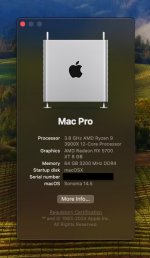
CPU: AMD 3900x
GPU: AMD 5700xt
MOBO: Asus ROG X570 Crosshair VIII Hero
RAM: 64 GB
 

Attachments

Edit he following in your config.plist.
  1. Booter > Quirks > SetupVirtualMap = True/Enabled change to False/Disabled
  2. Update the AMD Kernel > Patches to the current release.
    1. The Patches in your config are only set to work with macOS Monterey or older.
    2. You also only have 16 x patches. There are 22 x patches for Sonoma and 25 x patches for Sequoia.
    3. https://github.com/AMD-OSX/AMD_Vanilla
  3. Misc > Security > SecureBootModel = Default change to Disabled (this often helps when installing or updating Sonoma).
 
  • Like
Reactions: moedo
Edit he following in your config.plist.
  1. Booter > Quirks > SetupVirtualMap = True/Enabled change to False/Disabled
  2. Update the AMD Kernel > Patches to the current release.
    1. The Patches in your config are only set to work with macOS Monterey or older.
    2. You also only have 16 x patches. There are 22 x patches for Sonoma and 25 x patches for Sequoia.
    3. https://github.com/AMD-OSX/AMD_Vanilla
  3. Misc > Security > SecureBootModel = Default change to Disabled (this often helps when installing or updating Sonoma).

Thanks so much @Edhawk !

I was able to load a lot more verbose, however it still gets stuck before loading the installer.
  1. I believe all the changes were made to my config.plist
    1. (For #2, I patched the 4 lines with '0C' to represent my 12 cores).
  2. I also replaced the SSDT-EC-USBX-DESKTOP.aml with a newer version
  3. I attached my updated EFI folder with updated OC log as well as a picture of the screen where it stops
Your help is really appreciated!

Thanks
 

Attachments

Finally got this installed, had to start over with a new EFI.

Issues:
  • System crashes and reboots when clicking on stuff, or when things are loading
  • No internet
Otherwise it works. If anyone has any advice for the crashing - please let me know, would be appreciated.

Screenshot 2024-07-16 at 8.07.18 AM.jpg
 
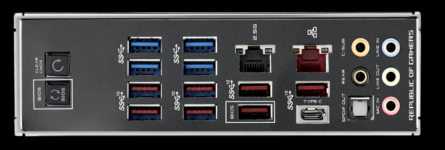
Your Asus motherboard has 2 x Ethernet ports, each with a different controller.

Screenshot 2024-07-16 at 16.48.14.png ROG Crosshair VIII Hero I/O plate
  1. Realtek RTL8125-CG 2.5G - Black Ethernet port
  2. Intel I211-AT - Red Ethernet port
The Intel Ethernet port is problematic in macOS, has been for a while. Best not to use this port.

The Realtek 2.5GB port should work using Mieze's LucyRTL8125Ethernet.kext in macOS without any issues. It is what I use on my Asus B550 & X570 systems.


Would need more information before I could comment with any meaning on the cause of the crashes.

Creating a custom USBMap.kext with Corpnewt's USBMap script would be a goo place to start. If I recall correctly your EFI doesn't contain a custom USB configuration, which is essential if you want to get your system working 100% with macOS.

 
  • Like
Reactions: moedo
Thanks again!

Internet issue solved:
  • Realtek 2.5GB port is now working with LucyRTL8125Ethernet.kext.
Crashing issue solved:
  • While fixing the internet, I read a USB guide at tonymacx86 that 'with the release of OpenCore 0.9.3 the XhciPortLimit Quirk has now been fixed' (https://www.tonymacx86.com/threads/the-new-beginners-guide-to-usb-port-configuration.286553/) so I enabled that. Upon restart the system speed increased and crashes totally stopped (all USB ports also work). System has been stable for >3hrs so far. So it seems the issue was indeed USB related, thanks for spotting that!
    • However I will resume the port mapping, using USBMap, as it seems a more 'official' way to setup macOS for full functionality, as you stated.
Really appreciate your help!
 
  AdBlock Detected
Sure, ad-blocking software does a great job at blocking ads, but it also blocks some useful and important features of our website. For the best possible site experience please take a moment to disable your AdBlocker.